.png)
WKS 10 - Quote Pricing and Discount Structure
Workshop on to cover structure of quote pricing and discounts .
Participants
Name | Company | Role |
|---|---|---|
Teemu Salonen | Valio | Pricing Analyst |
Tomi Toivonen | Valio | Pricing Manager |
Omar Bendada | Ben Consulting Services | Business Analyst |
Sofia Simaria | Ben Consulting Services | Proxy Product Owner |
Kaoutar Bennadi | Ben Consulting Services | Developer |
Alain Becker | Pearson Ham Group | Operation Manager |
Christiaan Van Eden | Pearson Ham Group | Consultant |
Goal
This workshop is to define all pricing and discounting elements applicable in the quote.
Workshop materials
Topic | Document | Comment |
|---|---|---|
Colum visibility within quote line | CPQ tool demo 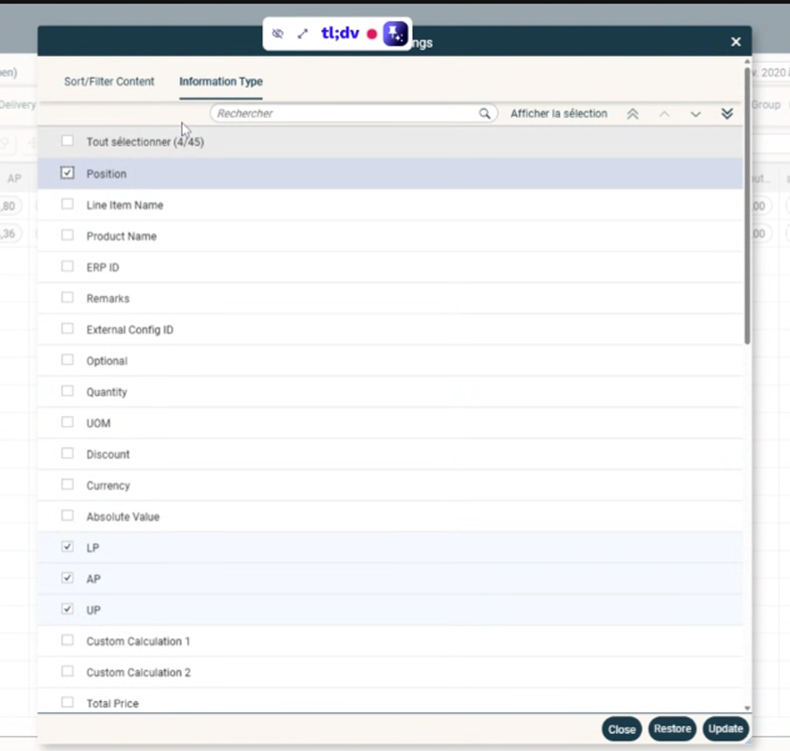 | Select which columns to visualize |
Options for displaying Pricing Elements in Quote | CPQ tool demo 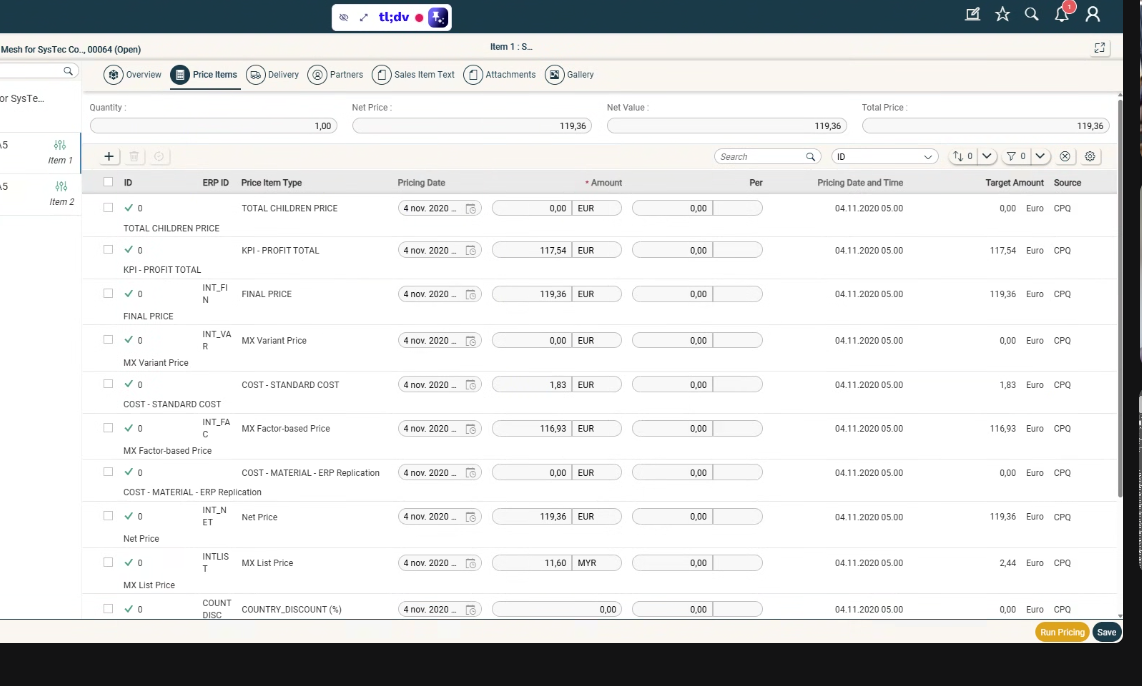 | Expand price items within quote line |
Columns in Product Pricing Screen | 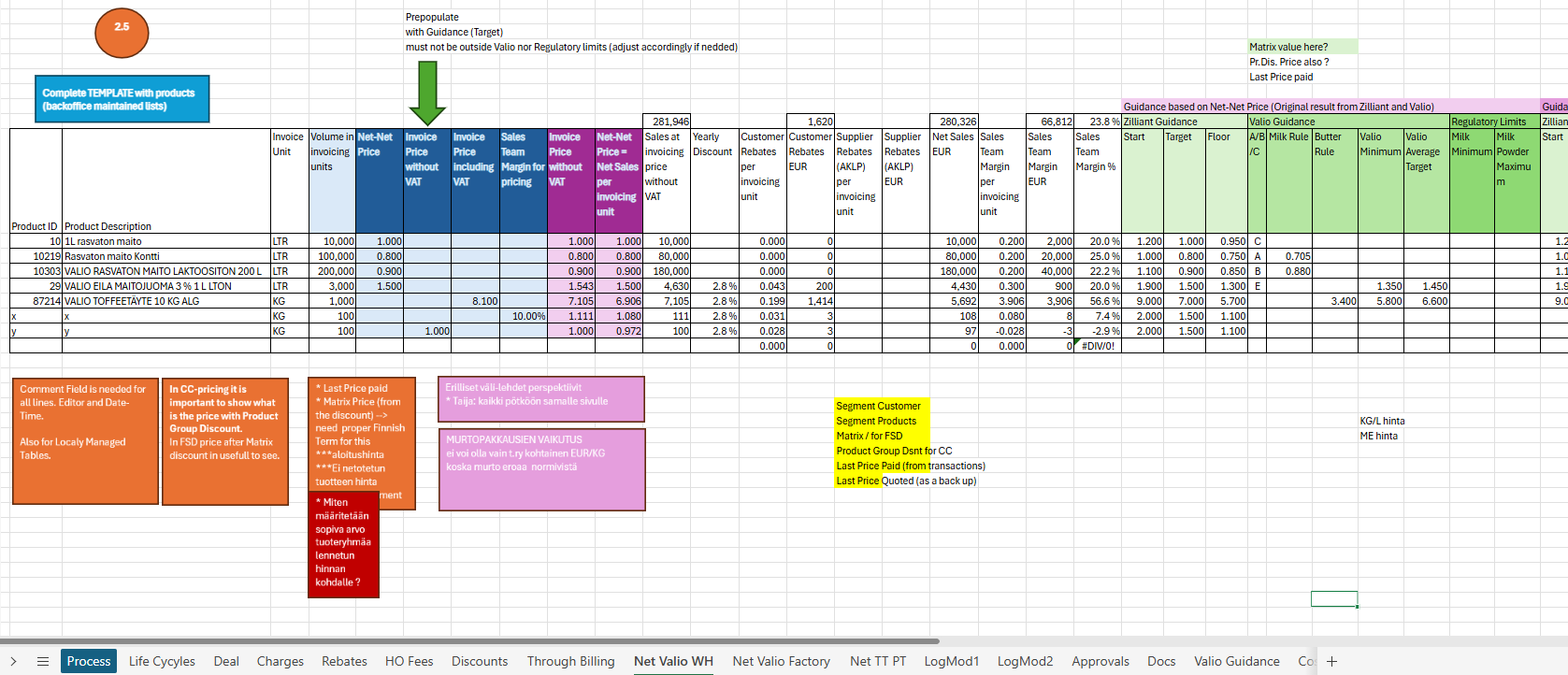
| ‘Valio WH’ tab |
Quote approval info | 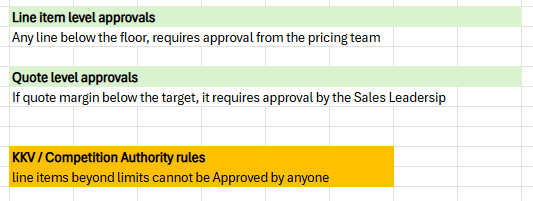 | ‘Approvals’ tab |
Main results
Quote Pricing Structure and Strategy
Team defines pricing display location and sales process for quote generation
Define manual input options for sales when generating quotes, including specific discounts
Identify key price-related information to display in quote: matrix prices, customer/product segment prices, last price paid
Proposed pricing approach: Pre-populate invoice price with Zilliant Target value that sales reps can adjust
Guidance price will be displayed without VAT
Price recommendations may vary based on estimated customer purchase volume
Need to track total value of price and volume for internal profitability calculations without displaying to customer as ‘Total Price’
Propose displaying basic pricing guidance values on grid, with detailed margin and cost breakdown in separate view
Need specific unit of measure calculations for product pricing across different packaging units
Unit of measure table to be provided per product for consistent pricing calculations
Quote pricing strategy established with % minimum margin requiring leadership approval
Sales representatives must provide accurate volume estimates to avoid inconsistencies in periodic reviews.
Pricing System Configuration
CPQ interface allows flexible column display and customizable pricing views for sales representatives
Current system limitation: column view preferences are user-persistent, not customer-specific
Consider implementing UI restrictions based on user roles for different customer pricing visibility
Euro confirmed as default currency for pricing system
Need to display prices with and without VAT
Multiple VAT rates exist but they are product dependent; data comes from Product Master table.
Pricing Approval Workflow
Approval triggers for pricing to be based on line item floor prices and quote-level margins
Need to implement pricing triggers at line item and quote levels that cannot be manipulated by users.
Line items below floor pricing require approval from pricing team, with Floor price as approval threshold.
Quote-level approvals managed by leadership, with target quote margin as threshold (coming from lookup table).
Contractual Pricing Considerations
Potential for multiple quotes attached to same annual agreement
Consider adding fields to show previous vs new pricing during price updates
Discuss including freight costs and additional product-linked costs in pricing calculation (additional lookup tables)
No general quote-level discount to be implemented currently
Pricing dates to be managed using contract start and end dates (defined in Deal - level info tab)
Pricing for customer quote to remain consistent even if contract signing is delayed; margin to be recalculated using most recent costs and, if appropriate, sales rep to renegotiate.
Pricing Calculation and Measurement
Use existing Excel pricing calculation file as starting point for quote model design
Unit of measure configurations are stable and not frequently updatable
Line item estimated sales value (unit price multiplied by quantity) meaningful for sales reps to prioritize and analyze quote lines
Action list
- BCS to get info from Zilliant on limitations of CPQ in terms of max elements to display as quote line columns and expansion rows (within a line).
- In next workshop, design quote model with team identifying mandatory and set which fields to have as columns versus expansion of price items
- In next workshop, define multiple quote types: eg initial quote and amendment quote
- Revisit user experience to define which columns should be on the ‘left-hand’ side of the quote-line screen (ie most important for the user) versus additional columns to move to the right-hand side.
Decisions
- Currency does not need to be shown to the user, as all quotes are in EUR
List of requirements
Calculate price per invoicing unit, by using the data in UoM table for conversion. UoM are stable per product (never change).
Lookup table for target quote margin
Lookup table(s) for freight and other costs
In agreement amendment quotes, display previous price
Display Last Price Paid (if feasible; new integration, needs to come from transaction) or Last Price Quoted (as backup)
Display Matrix Price for delivery business = PIQ matrix discount X Distribution channel price list, in addition to all the other price points
Ideally, have multiple ‘views’, with different set of columns so the users can better adapt to their need (currently not feasible in Zilliant CPQ)
Simplest pricing flow: pre-populate invoice price without VAT with PIQ Target; then user can do other things like setting margin and system re-calculates the price.
Calculate profitability at quote line level and at total quote level.
Agreement analytics to track sales against agreement commitments.
Pricing Date – should be the same as agreement date, defined in the Deal-level information, all calculations need to include costs and values that are applicable from start of agreement (eg MSP prices with future start dates; same with other cost components.)
Session recording
https://tldv.io/app/meetings/682da44ce556b900135177f4/