.png)
WKS 13 - Approval Workflow and Algorithm
Workshop on to cover approval workflow and algorithm.
Participants
Name | Company | Role |
|---|---|---|
Teemu Salonen | Valio | Pricing Analyst |
Tomi Toivonen | Valio | Pricing Manager |
Omar Bendada | Ben Consulting Services | Business Analyst |
Sofia Simaria | Ben Consulting Services | Proxy Product Owner |
Kaoutar Bennadi | Ben Consulting Services | Developer |
Alain Becker | Pearson Ham Group | Operation Manager |
Christiaan Van Eden | Pearson Ham Group | Consultant |
Goal
This workshop is for capturing all related to approval processes information and define the approval algorithms.
Workshop materials
Topic | Document | Comment |
|---|---|---|
Approval workflow diagram | 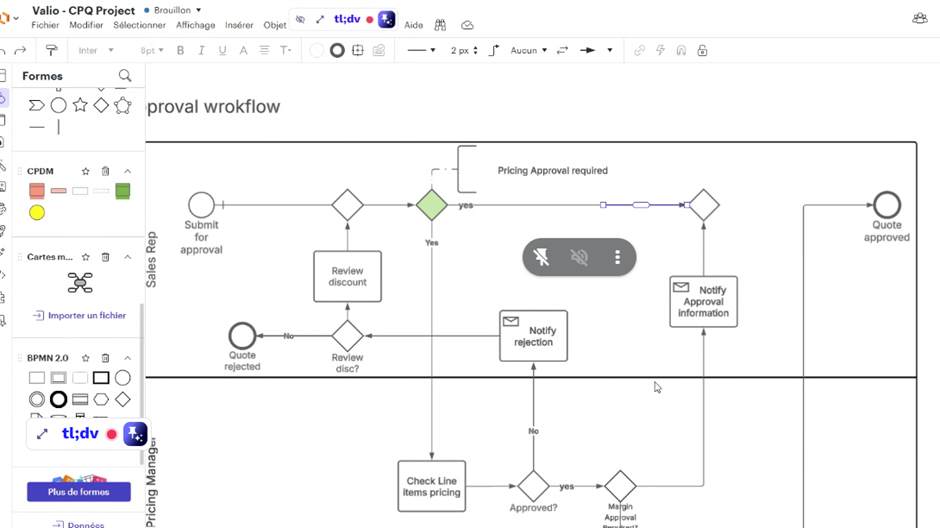 | |
Main results
Here's a summary of the CPQ Approval Workflow and Algorithm workshop, focusing on the key points around approval triggers, workflows, processes, and rules.
Approval Triggers
Line Item Level: Any individual line item whose price falls below the “Guidance” (a predefined minimum value) will trigger an approval request. This typically goes to the Pricing Team.
“Guidance”: Zilliant Floor OR Valio Guidance
Quote Level Margin: If the overall quote's profitability or "margin" is "below target" (as defined by lookup table), it will trigger an approval request. This typically goes to Sales Leadership.
Approval Workflows & Process
Sequential Approval: The team decided on a sequential approval process rather than parallel.
Line Item Check: The system first checks for any line items below the floor.
Pricing Team Approval: If line item issues exist, the quote is sent to the Pricing Team.
Rework & Resubmission: If the Pricing Team rejects the quote (or requires changes), it is sent back to the Sales Representative for rework. The Sales Rep must then re-trigger the approval process.
Quote Margin Check: Once all line item issues are resolved and approved (or if there were no line item issues initially), the system then checks the overall quote margin.
Sales Leadership Approval: If the quote margin is below target, it is sent to Sales Leadership for approval. Sales Rep selects the appropriate approver from drop-down list.
Final Outcome: If all required approvals are obtained, the quote moves to "Approved." If rejected at any stage, it returns to the Sales Rep for rework or is fully rejected.
No Direct Modification by Approvers: Approvers (Pricing Team, Sales Leadership) do not directly modify prices or line items within the system. Their role is to Approve or Reject the quote. Any modifications require the Sales Representative to rework the quote and resubmit it for approval.
No Approval Needed: If neither the line item trigger nor the quote margin trigger is activated, the quote can move directly from "In Review" to "Approved."
Approval Rules & Algorithm:
Margin Calculation: The overall quote margin will be calculated using a formula that considers the pricing margin, estimated servicing costs (e.g., delivery, picking, order management), and applicable rebates. A lookup table will define target margins based on factors like quote size and customer industry type.
Line Item Floor: A predefined "floor" value for individual line item prices will be used as a rule for triggering pricing team approval.
Quote Margin Target: A "target" margin percentage will be used as a rule for triggering sales leadership approval.
Quote Life Cycle & Statuses:
Key Statuses: The proposed quote life cycle includes "Open," "In Review" (or "In Progress" / "Pending Approval"), "Approved," "Rejected," "Accepted by Customer," "Won," and "Lost."
Locked Status during Approval: When a quote is in an "In Review" or "In Progress" status for approval, most fields are locked and cannot be changed by anyone, including the Sales Representative.
Return to "Open" for Rework: If a quote is rejected by an approver, it reverts to the "Open" status, allowing the Sales Representative to make necessary modifications before resubmitting.
Customer Acceptance: If a quote is "Accepted by Customer," it moves to "Won" and automatically generates an agreement. If not accepted, it returns to "Open" for further updates.
Sales Rep "Take Back" (Discussed): There was a discussion about allowing Sales Representatives to "take back" a quote from any status (except "Accepted by Customer" or "Won") to revert it to "Open" for modifications. This was not definitively decided but considered for flexibility.
Notifications & Reminders:
Email Notifications: Automated email notifications will be sent to the Sales Representative when a quote's approval status changes (e.g., approved, rejected, sent back for rework).
Direct Link in Email: These emails will include a direct link to the specific quote in the CPQ system.
No Direct Email Approval: Approvers are required to log into the CPQ system to approve or reject; direct approval/rejection via email is not supported.
Reminders for Pending Approvals: The system should send reminders for pending approvals, with a suggested frequency of every 12 hours (immediately after submission, then every 12 hours until approved). This functionality needs to be confirmed with the system capabilities.
Editable Fields (Outside "Open" Status):
While most fields are locked when a quote is not in "Open" status, certain customer information fields will remain editable:
Owner
Contact Information
Address
VAT ID
All other fields will be locked to maintain quote integrity during the approval process.
Action list
- Valio to define logic and formulas for margin calculation as well a lookup table for ‘margin targets’ that drive quote approval triggers.
Decisions
List of requirements
Approval Trigger Implementation:
Develop logic to identify quotes with line items priced "below guidance".
Develop logic to identify quotes with overall margin "below target".
Implement mechanisms to initiate the approval workflow based on these defined triggers.
Sequential Approval Workflow Engine:
Design and build a workflow engine that enforces sequential approvals (e.g., Pricing Team first, then Sales Leadership).
Enable routing of quotes to the correct approver(s) based on trigger conditions.
Implement functionality for approvers to "Approve" or "Reject" quotes within the system.
Quote State Management:
Implement distinct quote statuses: "Open," "In Review" (or "In Progress"), "Approved," "Rejected," "Accepted by Customer," "Won," and "Lost".
Develop rules to automatically transition quotes between these statuses based on approval outcomes and customer actions.
Ensure that most quote fields are locked when in "In Review" or other non-"Open" statuses.
Allow specific fields (Owner, Contact Information, Address, VAT ID) to remain editable even in non-"Open" statuses.
Rework and Resubmission Mechanism:
When a quote is "Rejected," automatically revert its status to "Open" to allow the Sales Representative to make modifications.
Support the Sales Representative's ability to resubmit a reworked quote for approval, re-triggering the workflow.
Notification System:
Develop an automated email notification system to inform Sales Representatives of approval status changes (e.g., approved, rejected, sent back for rework).
Ensure notification emails include a direct link to the relevant quote in the CPQ system.
Implement reminder notifications for pending approvals, with configurable frequency (e.g., every 12 hours).
Margin and Pricing Algorithm Development:
Develop the specific algorithm and formulas for calculating overall quote margin, considering pricing, servicing costs, and rebates.
Integrate a lookup table for defining target margins based on quote size and customer industry type.
Session recording
https://tldv.io/app/meetings/68358d562612c9001339341f/