.png)
WKS 3 - CRM Integration: Part 1
Workshop on to cover CRM integration
Participants
Name | Company | Role |
|---|---|---|
Teemu Salonen | Valio | Pricing Analyst |
Tomi Toivonen | Valio | Pricing Manager |
Alain Becker | Pearson Ham Group | Operation Manager |
Christiaan Van Eden | Pearson Ham Group | Consultant |
Omar Bendada | Ben Consulting Services | Business Analyst |
Sofia Simaria | Ben Consulting Services | Proxy Product Owner |
Goal
This workshop will help to understand the data exchange between the CRM and the CPQ and to define the mapping of data into and out of the CPQ.
Workshop materials
Topic | Document | Comment |
|---|---|---|
Parent Customer discussion | 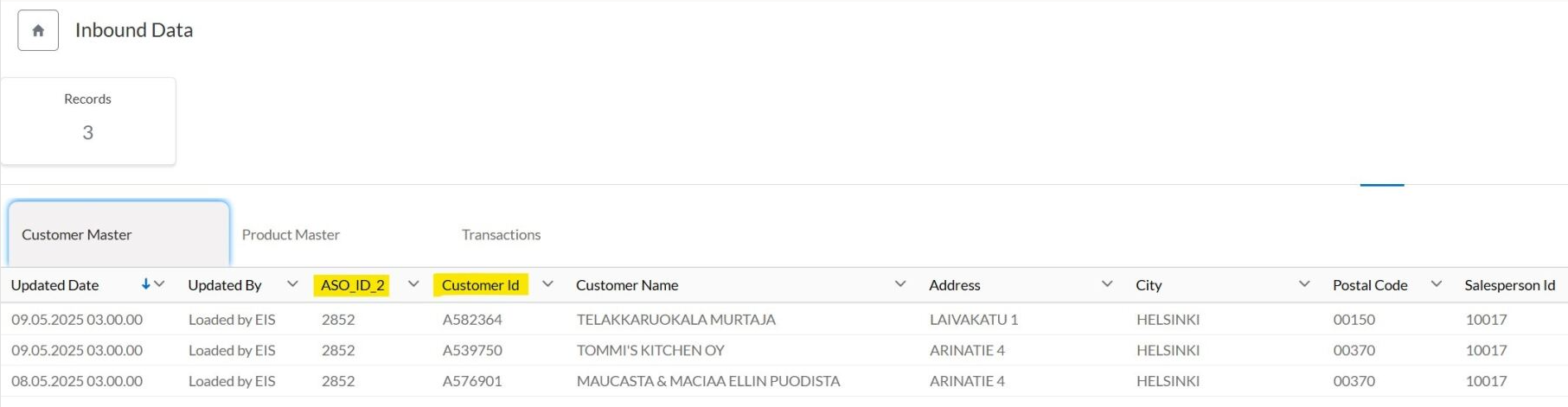 Customer Master in Price Manager - parent fields
| Analyzing fields in the Customer Master table that are associated with the ‘parent customer’, which is the customer level used for pricing and quoting |
Customer Master data |
| |
/WKS%202/WKS%202%20Example%20picture%20Parent%20customer%20with%20Childrens%20in%20Zilliant%20Price%20manager.jpg?csf=1&web=1&e=Me1HUM)
Main results
CRM and CPQ Integration Strategy
No direct interaction planned between CPQ and ERP or CRM systems initially
CRM and CPQ integration potentially postponed for 1-2 years
CRM integration to capture customer information including ERP ID, ASO ID, payment terms, and customer type
Implement customer status field to track active/inactive business relationships
Customer Master Data Mapping
Customer Master data coming from Price Manager
Map CRM customer master data fields to specific CPQ system fields
Customer Master data in Price Manager is the child level information, but all pricing is done at parent level. Quotes can only be done for parent customers - need to consolidate multiple rows into a single row at parent level
Customer Master table fields to integrate with CPQ. But we need to aggregate – remove duplicates.
ASO_ID_2: parent ID – level in which we want to set condutions
ASO_Name_2: name of parent ID
SalesPerson ID
SalesPersonName
TMA ID_2 – used in segmentation >> for new customers sales reps need to fill
TMA_Name_2
Distribution Channel – 1: from warehouse only, 2: from cash and carry only, 3: both: maybe not needed
Valio_Aimo_Flag: maybe not needed
Some customer master data is currently incomplete and requires manual data entry
Distribution channel numbering explained: 1 = warehouse, 2 = carry, 3 = both channels
Sales reps may need to manually fill in missing customer address information
Payment terms will likely be negotiated per proposal, not automatically imported
In CPQ, sales reps should search by customer name in addition to ID (maybe concatenation).
Missing the address of the parent / deal-level id; need to be filled manually (only bill-to address is relevant) > very limited information to define in the agreement; further discussion is needed
Action list
- Invite CRM person to next meeting to see if there is more customer info available
- Teemu to export customer master data from Price Manager system to Excel and colour code fields for data mapping
Decisions
- Addresses and contact details to be manually managed by sales representatives in system
List of requirements
Filter customer IDs in CPQ to show only parent-level customers.
Include fields like ASO_ID_2, ASO_Name_2, Sales Person ID/Name, and TMA ID/Name in the customer master table >> stilll TBD
Enable manual input of customer address and contact information in CPQ.