.png)
WKS 6b - Business Process Definition: Part 2
Workshop on to continue the definition of the quoting business process.
Participants
Name | Company | Role |
|---|---|---|
Teemu Salonen | Valio | Pricing Analyst |
Tomi Toivonen | Valio | Pricing Manager |
Alain Becker | Pearson Ham Group | Operation Manager |
Christiaan Van Eden | Pearson Ham Group | Consultant |
Omar Bendada | Ben Consulting Services | Business Analyst |
Sofia Simaria | Ben Consulting Services | Proxy Product Owner |
Kaoutar Bennadi | Ben Consulting Services | Developer |
Goal
The goal of these workshops is to map all the company's use cases as defined in the application, and to clarify the Sales processes to be implemented.
Workshop materials
Sujet | Document | Commentaire |
|---|---|---|
Quoting / Deal Proposal Process |  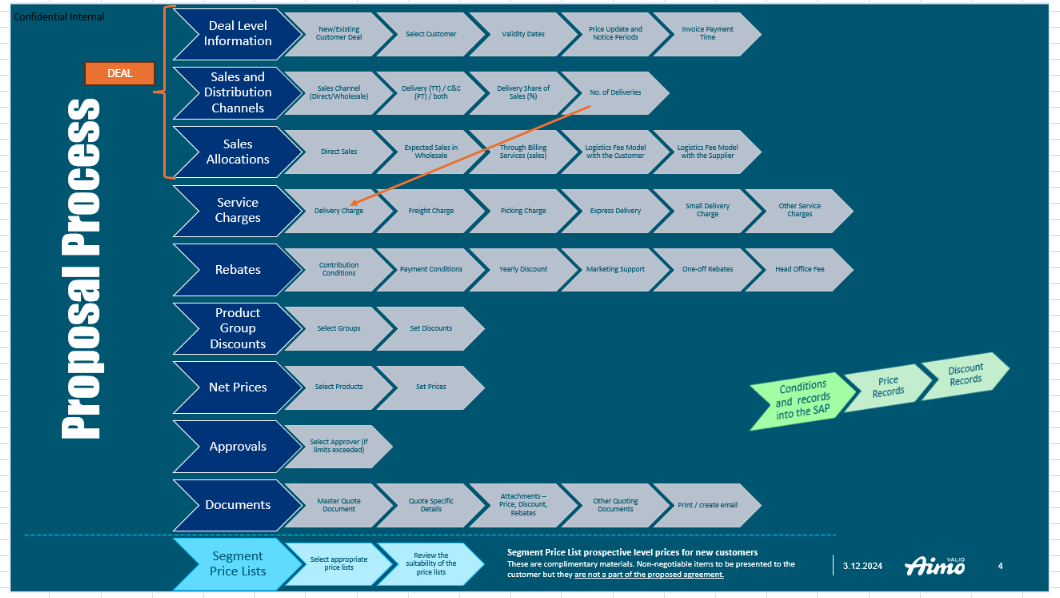
| Excel workbook containing Valio’s requirements for the end-to-end quoting process, to be implemented in the CPQ tool. Each tab corresponds to a step in the quoting process. |
Main results
Business Process for Deal Proposal - Tabs / Tool Sections (continued from WKS 6a)
Process flow – sales people think of terms & conditions first (ie rebates), and only afterwards setting the product and prices. This way, at the end they will be able to calculate the correct margins. For margin estimation, sales rep inputs the estimated volumes.
Valio’s Excel workbook contains details of the steps, one per tab, in the desired order.
Each tab/step contains a mix of manual inputs from the sales rep and guidance/data coming from lookup tables.
Below are the steps discussed in today’s workshop:
Discounts
% Discount by product group (ID Level 3)
Start/Target/Floor guidance coming from Price Manager Locally Managed Table
Sales allocation %
Maintained in LMD by customer segment
High Level Customer Type: HORECA/Industrial/Meal Services – might vary
For existing customer, ideally we get the allocation from the historical data; for new customers looks at the lookup table. >> for both cases LMD comes from PM Zilliant. How to populate them, it would be either manually by Valio or they could have PIQ to automatically refresh them (Tomi to consider this and take to Z team).
Non net priced sales
at this point it does not show the accurate value because product net price has not been taken into account. This is a forecast based on those high level values that the sales rep introduced.
Sales rep inserts high level EUR volume in the Deal tab >> total KG is computed through product master data >> this is converted into Non Net price sales in order to get a good margin estimation. This is a very important factor for the stakeholders.
Through Billing
Through Billing is a type of service, invoices go through our system to customers so that manufactures get their money. We get a commission. Customer might get a share of this commission and get additional discounts.
Supplier ID
Through Billing amount
Discount %
Discount given to customer on that invoice. We are selling many articles for the customers; we have economies of scale in our systems compared with manufacturer. So take care of invoicing those additional items into the invoices we are already doing with the customer
30% of commercial customers have this service; 10% out of this have discounts – but usual very big deals
Net Prices (Net Valio WH)
This is the section where the sales rep defines the list of products that will have a net price agreement.
Large number of sections / columns required > refer to Valio’s Excel
Product ID; Invoice Unit; Sales Unite Size; …. volume in invoicing unites (sales rep inputs this)
Zilliant Guidance: S/T/F net price
Valio Guidance: historical way of doing business; set of lookup tables: A-E depending on volume. Milk products, butter products, minimum, average target
Regulatory limite on milk products: need to obey these limits
If price falls outside the guidance (Zilliant or Valio) there need to be some color coding or approvals. But for regulatory limits, we cannot allow them to move forward, if they exceed limits.
In new SAP prices need to be set at invoicing unit level
List of products, we can show the product group nice to have (if can be expanded/collapsed), but no need if we need to save columns.
Another set of guidance without VAT but adjusted with rebates.
Lastly, some deals need to be priced including VAT (and rebates)3 sets of guidance – would be good to select what view to use (with / without VAT / rebates) > ideally a drop down to select with columns to view (and then could be expanded)System to pre-populate column J according to target value of guidance, then give opportunity to sales reps to adjust pricesEdit : Valio Team will simplify this feature significantly by stripping down most options. Details to be placed into the excel mock-up.
Supplier rebates – fixed value, as volumes are known (eg 1 EUR per invoicing unit if that product is included in the deal). Data is manually updated at the time of creating the quote (by sales rep or backoffice person)
MSP, LMD from Price Manager
Costs, from lookup tables
Calculate margin
Net Prices (Net Valio Factory)
For huge volumes we sell directly from factory
Same quote structure as in Net Valio WH
Net Prices (FSD + CC)
In total, 3 or 4 potential sources (ie from where the product is sourced before being sent to client):
Valio Factory - Valio products, might sell directly from factory (top big customers, only valio products)
Valio Warehouse (only valio products; larger units (whole case)
FSD warehouse; delivered to customer – smaller units; We can now serve more to the customers, eg smaller units via FSD channel and more set of products.
CC – customer collect themselves
Maybe FSD and CC can be combined in the same tab. From user experience, having two sheets is clearer. Goal is to encourage the salesrep to pay careful attention to the source
All goods end up in a terminal distribution system with further operations (cross stocking, consolidation etc)
Having 3 or 4 tabs – one for each distribution channel (potentially combine FSD+CC)
Makes clearer which items to use in manufacturing and which in their smaller operations
Logistics Models
Some big customers will require other bits, eg negotiate directly with suppliers. They agree on a price and Valio agrees on a fee
Logistic Model 1 (with customer)
Logistic Model 2 (with supplier)
LogMod1 and LogMod2 are SAP condition tables already in Z-PM
Detailed meeting notes below.
Product Pricing and Sales Allocation Strategy
Quote lines to have two types of granularity: product level and discounts
Analyze sales distribution across product groups and allocation tables
Team discusses pricing structures, suggests euro calculations and allocation by product category
Investigate how system calculates percentage of sales allocation across rows
Discuss product group discounts strategy
Discussed product pricing strategy for potentially hundreds of products
Pricing conditions and discounts to be integrated into CPQ and output tables in Price Manager
Product view depends on customer type and pricing requirements
Sales team pricing calculated from lowest sales price
Pre-populate prices without VAT and provide options to set prices with rebates
Explore multiple options for selecting correct data fields
Review display values for sales representatives
Apply rebates on prices without VAT
Customer and Discount Classification
Customer type categories identified for discount determination, including Individual and HORECA
Customer type classification deemed critical for business process
Create lookup table for customer allocations
System requires customer information to accurately determine sales allocation.
Team to calculate summary tables for price IQ using transactional data (TBD)
Maintain customer-specific sales allocation as locally managed data
Create two separate data tables: aggregated by customer category and individual customer data
Allocation method varies by customer type (cafeteria vs restaurant).EDIT: It’s the same allocation method
Existing customers have known allocation methods; new customers need assessment.
Extract pricing unit data from current system for new SAP implementation.
Team developing lookup table structures using product ID, product group ID, and customer segmentEDIT : Team developing lookup table structures using ID, product group ID, and customer for new customers, and product group and parent customer for existing customers
Pricing Model and Margin Analysis
Pricing model based on sales rep estimates, transactional data review, and product margin analysis
Analyze final profit margins accounting for potential discounts
Commission fees from manufacturers can offset customer discounts
Pricing guidance established with hard limits requiring approval for deviations
Define business value limits with approval process for values falling below guidance thresholds
No sales authorized if regulatory guidance limits are not met
Implement process stoppage mechanism for values breaching regulatory guidance
Ensure no unauthorized approvals for out-of-limit values
Price commitment must be exact per product deal to maintain strongest customer value
Ensure specified product price remains consistent despite potential group discounts
Pricing conditions have significant impact on profitability
Business Process and Operational Considerations
Review sales team workflow and billing process considerations
Commercial customer billing services explored, with potential service discounts for select customers
Some deals to be priced including VAT
Clarify system workflow: Determine who adds specific information - sales rep or another party
Plan to use cost data and minimum sales price for margin calculation
Company can sell directly from value factories for large order sizes to reduce operational complexity.
Sales reps must consider multiple distribution channels when serving customer needs.
Track warehouse, picking, distribution costs to calculate business margins and added value metrics
Finland's distribution system differs from mainland Europe due to lower population density.
Pricing Conditions and Data Management
Clarify that net price agreements supersede standard discount pricing strategies
Existing customer lookup table discussed as potential reference
Investigate manual maintenance in Zilliant and potential data refresh from transactional sources
Determine desired frequency and calculation method for refreshing data
Product pricing defaults to discounts when net price is not specified
Team to clarify requirements for displaying additional pricing columns
Team discussing potential supplier negotiations for customer quotes
Design process for items not currently in price manager
Price manager team to complete work as requested by Tomi
Change orders will be issued for additional vendor work
Confirm simple calculation methods for pricing elements
Exploring supplier rebate options to include products in quote
Discuss data history retention strategy
Complex sales model requires meticulous architectural design due to unique selling approach
Action list
- BCS to meet with Zilliant to understand the API to connect CPQ-PM so we decide where the LMD tables will live.
- Team to determine database design and integration strategy for implementing lookup tables.
- BCS to ask Zilliant CPQ team if we can have two types of quote lines: on at product group (for discounts) and one at product ID (for net prices)
- Valio team to determine how to populate Sales Allocation tables by Customer and Customer Segment - manually or using Price IQ automation
- Define if we need 3 or 4 tabs for define Net Prices, according to distribution channel: 1) Valio WH, 2) Valio Factory 3) FSD Delivery Channel 4) Cash & Carry Store, or combine 3)+4)
- BCS to assess complexity of requirements versus assumptions from original project estimate
- Valio Team will simplify Guidance feature significantly by stripping down most options. Details to be placed into the excel mock-up.
Decisions
List of requirements
Refer to Valio’s excel.
If price falls outside the guidance (Zilliant or Valio) there need to be some color coding or approvals.
If price falls out of regulatory limits, we cannot allow them to move forward.