.png)
WKS16 - Pricing Logic
Workshop on to cover pricing logic needed in the CPQ tool.
Participants
Name | Company | Role |
|---|---|---|
Teemu Salonen | Valio | Pricing Analyst |
Tomi Toivonen | Valio | Pricing Manager |
Omar Bendada | Ben Consulting Services | Business Analyst |
Sofia Simaria | Ben Consulting Services | Proxy Product Owner |
Alain Becker | Pearson Ham Group | Operation Manager |
Goal
Capturing the pricing data sources, calculation rules, collect all elements involved in price calculation and design the pricing model for the system.
Workshop materials
Topic | Document | Comment |
|---|---|---|
Distribution Channel List Prices |  | Table in Price Manager where Distribution Channel List Price can be found |
Matrix Prices | 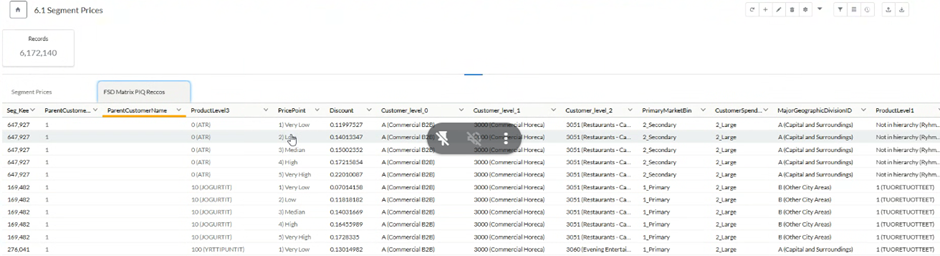 | Table in Price Manager where Matrix Prices (Discounts) can be found |
Net Price Negotiated Guidance |  | Structure of S/T/F guidance for net price negotiation, coming from Zilliant Price IQ |
Segment List Prices |  | Tables in Price Manager where Segment Price Lists can be found |
Main results
Net Price Guidance from Price IQ
Guidance Display: The sales representative needs to see the guidance results. This includes the "Start," "Target," and "Floor" values, which are normalized variables (NVs).
Calculation in CPQ: The NV values (markups on cost) from Price IQ will be retrieved, and the final net price (Start/Target/Floor) will be calculated directly in CPQ by multiplying the NV by the most recent or future MSP (Minimum Selling Price).
MSP as Reference: The MSP is crucial for calculating the net price. It comes from Price Manager and changes periodically. The future MSP value should be used for pricing proposals, ie we need to retrieve the MSP applicable to the contract start date.
Data Source & Integration: The "Start/Target/Floor NV" values will be looked up from a published table in Price Manager (e.g., "Price IQ Negotiated prices" or "Published Price History" tables). This table should be accessible via API calls from CPQ due to its potentially large size, to avoid overloading the CPQ system.
Dimensions for Lookup: The guidance is provided at a product-customer level, meaning the lookup for existing customers will directly use Product ID and Parent Customer ID.
Guidance for Existing Customers vs. New Customers
Existing Customers: For existing customers with transaction history, the guidance will come directly from the Price IQ output table based on Product ID and Parent Customer ID.
New Customers: For new customers (or existing customers without transaction history for a specific product), Price IQ will produce recommendations based on several customer dimensions (eg customer level 2, customer spend bin, region etc). In such cases, the sales representative in CPQ will assign a customer category/segment (e.g., TMA group) from a dropdown list. CPQ will then use a separate lookup table (maintained locally in CPQ initially) to provide an NV recommendation based on these customer segments.
Price with Product Group Discount for Reference to the Sales Rep
Purpose: Sales representatives need to see a reference price to help them in negotiations and to avoid offering prices higher than what's available elsewhere (e.g., to other pizzerias). This is important for building confidence in the tool.
Display Name: This column will be named "Price with Product Group Discount".
Calculation Logic:
Rule: If a "Matrix Price" exists, display the Matrix Price (Matrix Discount multiplied by the Global List Price).
Fallback: If no Matrix Price exists, display the Distribution Channel List Price minus the Product Group Discount.
Data Sources:
Global List Price: This comes from an output table in Price Manager.
Matrix Discount: This is a calculated discount (combination of product and customer segments) that needs to be stored and looked up. It will come from an output table in Price Manager.
Distribution Channel List Price: This comes from the "distribution channel price lists" output table in Price Manager. The distribution channel values are "PT" for Cash & Carry and "TT" for Delivery.
Product Group Discounts: These are maintained in CPQ locally as a lookup table with recommendations and are defined by sales representatives on a customer-by-customer basis. They are then sent back to Price Manager as an output table to go to SAP.
Current Lowest Segment Price
Purpose: To show the sales representative the lowest price for a product in a specific segment (either product segment or customer segment). This is crucial for avoiding offering prices higher than what other similar customers might be getting.
Data Sources: This information comes from "product segment price lists" and "customer segment price lists" output tables in Price Manager.
Display Logic: If a product is in multiple segment price lists, the system should display the lowest value.
Current Value: The system should show the "current" (today's) price, specifically the highest valid-from date with the lowest value combination, considering both product and customer segment tables.
New Customers: For new customers whose IDs are not in the system, this column might be empty.
Integration with Price Manager (General Points)
Data Hub: Price Manager is generally seen as the home for pricing data and optimization algorithms, while CPQ is the tool for sales interaction and quote generation.
API Calls: To avoid overloading CPQ with large datasets, the preference is to query pricing tables (like Price IQ guidance, global list prices, matrix discounts, distribution channel lists, segment price lists) directly from Price Manager via API calls.
Data Consistency: If a data point is needed in both Price Manager and CPQ, it should ideally reside in Price Manager, with CPQ looking it up.
Limited CPQ-to-PM Integration: Integration for data transfer from CPQ to Price Manager should be limited to the minimum necessary (e.g., product group discounts for SAP).
Other Relevant Considerations:
Valio Guidance: This refers to guidelines provided by Valio for certain types of products. It's needed in both Zilliant Price Manager and CPQ. It's not currently in Price Manager but it should bein the future. As a workaround, it can be temporarily managed locally in CPQ. However, if there's a strong dependency with Price Manager's optimization system, it should eventually be implemented there and called via API. The data structure for Valio guidance needs to be defined.
Customer Specific Prices (CSP): These are temporary, corrective prices set at a customer level to fix issues not covered by standard rules. While they exist in Price Manager, they are likely to confuse sales representatives and are not considered relevant to expose in CPQ. The goal is to fix the underlying deal structure rather than rely on CSPs.
Formulas: The detailed pricing formulas will be developed in Excel by the Valio team by June 9th and then translated into CPQ code.
Session with Zilliant Data Scientist: A follow-up session with the Zilliant data scientist (Natalia) is required after Valio validates the Price IQ recommendations. This session will clarify how CPQ should query the guidance, especially for existing vs. new customers.
Action list
- A session with the Zilliant data scientist (Natalia) is needed to clarify the exact lookup methodology for existing vs. new customers and the structure of the output tables once Valio has signed off on the Price IQ recommendations.
- The data structure for Valio guidance needs to be defined.
Decisions
- Do not include CSP values in the CPQ tool
List of requirements
Net Price Guidance Implementation:
Guidance Display: The system must display "Start," "Target," and "Floor" values (Normalized Variables - NVs) to the sales representative.
Net Price Calculation: Implement the calculation of the final net price (Start/Target/Floor) in CPQ by multiplying the retrieved NV by the most recent or future Master Selling Price (MSP).
MSP Integration: Retrieve MSP values from Price Manager for use in net price calculations.
NV Data Source: Look up "Start/Target/Floor NV" values from a published table in Price Manager (e.g., "Price IQ Negotiated prices" or "Published Price History").
API Integration for NVs: Ensure the NV lookup table is accessible via API calls from CPQ to handle potentially large datasets efficiently.
Existing Customer Lookup: For existing customers, the NV lookup must use Product ID and Parent Customer ID.
Guidance for New Customers:
Customer Segment Assignment: Provide a dropdown list in CPQ for sales representatives to assign a customer category/segment (e.g., TMA group) for new customers or those without transaction history. Use estimated sales as input for Customer Spend Bin.
New Customer NV Lookup: Use a separate lookup table (initially maintained locally in CPQ) to provide NV recommendations based on assigned customer segments for new customers.
Reference Price Display ("Price with Product Group Discount"):
Display Column: Create a column named "Price with Product Group Discount" for sales representative reference.
Matrix Price Logic: If a "Matrix Price" exists (Matrix Discount * Global List Price), display it.
Fallback Logic: If no "Matrix Price" exists, display the "Distribution Channel List Price" minus the "Product Group Discount."
Global List Price Integration: Retrieve "Global List Price" from an output table in Price Manager.
Matrix Discount Integration: Retrieve "Matrix Discount" (calculated discount based on product and customer segments) from an output table in Price Manager.
Distribution Channel List Price Integration: Retrieve "Distribution Channel List Price" from the "distribution channel price lists" output table in Price Manager (identifying "PT" for Cash & Carry and "TT" for Delivery).
Product Group Discounts Management: Maintain "Product Group Discounts" locally in CPQ as a lookup table with recommendations.
Product Group Discounts Output: Send "Product Group Discounts" data from CPQ back to Price Manager as an output table for SAP integration.
Current Lowest Segment Price Display:
Purpose: Display the lowest price for a product in a specific segment (product or customer) to sales representatives.
Data Source: Retrieve this information from "product segment price lists" and "customer segment price lists" output tables in Price Manager.
Display Logic: If a product appears in multiple segment price lists, display only the lowest value.
Current Value Logic: Show the "current" price based on the highest valid-from date and lowest value combination from both product and customer segment tables.
New Customer Handling: The column for "Current Lowest Segment Price" might be empty for new customers whose IDs are not in the system.
General Price Manager Integration:
API-based Data Retrieval: Prioritize querying pricing tables (Price IQ guidance, global list prices, matrix discounts, distribution channel lists, segment price lists) directly from Price Manager via API calls to avoid overloading CPQ.
Limited CPQ-to-PM Data Transfer: Limit data transfer from CPQ to Price Manager to the minimum necessary (e.g., product group discounts for SAP).
Other Relevant Development Considerations:
Valio Guidance: Implement local management of "Value Guidance" data in CPQ as a temporary workaround if not yet available in Price Manager. Plan for future integration with Price Manager if dependencies arise.
Formulas Implementation: Translate detailed pricing formulas (to be developed in Excel by the Valio team) into CPQ code.
Session recording
https://tldv.io/app/meetings/6839579dae7251001355f1fd/